













Brisk Support for Web Apps
- Subscription
- 4.8
- V1.0.0
Online Help Desk Software and Support Ticketing System with Built-in AI
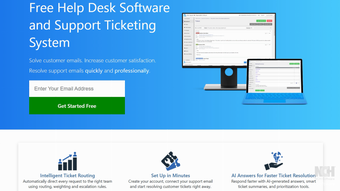
Brisk Support: Help Desk Software and Support Ticketing System
Brisk Support is a help desk software and customer support ticketing system that helps businesses organize customer emails, support requests, phone calls, and chats in one place. It makes it easier for support teams to prioritize incoming requests, assign tickets to the right agents, and respond to customers quickly and professionally.
Key Features
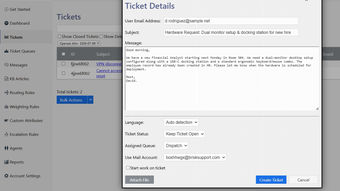
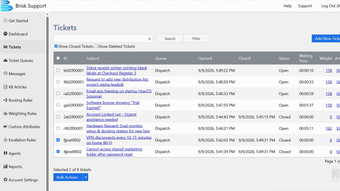
Support Ticket Management – Turn incoming emails, phone calls, and chats into organized support tickets. Search customer service history and keep conversations in one place.
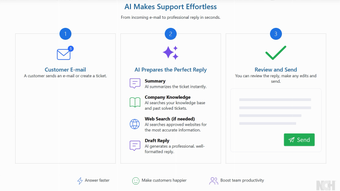
AI-Powered Answers and Summaries – Generate concise ticket summaries and context-aware answer suggestions so agents can understand and respond to requests faster.
Intelligent Ticket Routing – Use routing, weighting, and escalation rules to automatically direct support tickets to the appropriate queue or agent.
Knowledge Base and FAQ – Create a knowledge base to help agents answer common questions. AI can use resolved tickets and available knowledge to provide more relevant answers.
Team Collaboration and Queues – Create separate ticket queues for different products, departments, or localizations and assign agents based on their expertise.
Support Reporting and Analytics – Monitor agent activity, queue activity, response times, resolution times, ticket waiting times, and other support metrics to evaluate productivity.
How Brisk Support Works
Getting started is simple. Create an account and connect your existing support email address to Brisk Support. Incoming support emails are imported as tickets that your agents can manage from the help desk.
Tickets can be organized into queues and prioritized using weighting and routing rules. Agents can be assigned based on their skills, departments, or areas of expertise, helping ensure that important requests reach the right person.
Agents can review the customer conversation, use AI-generated summaries and suggested answers, edit the response, and send it directly from the help desk.
AI-Powered Customer Support
Brisk Support includes AI tools designed to reduce repetitive work and speed up ticket resolution.
AI can automatically summarize incoming tickets, suggest relevant answers, and turn a few words describing an agent's intended response into a complete, professionally formatted reply. The AI can also use your knowledge base and previously resolved tickets when preparing answers.
When additional information is needed, the AI knowledge system can search approved web sources to help provide more useful responses. Agents can review and edit AI-generated replies before sending them to customers.
Global Help Desk
Brisk Support is designed for teams serving customers in different regions. Built-in machine translation can translate incoming support emails into an agent's preferred language and help agents respond in a customer's native language.
Support teams can also prioritize tickets based on factors such as time zone, helping businesses provide better service to customers around the world.
Team Collaboration and Productivity
Brisk Support helps teams work together on complex customer issues. Tickets can be shared with product experts, localization specialists, or other team members when additional assistance is needed.
Detailed reporting tools help managers monitor support activity and identify opportunities to improve response and resolution times.
Why Use Brisk Support?
Brisk Support combines help desk ticketing, email support, AI customer service, ticket routing, knowledge base management, team collaboration, and support reporting in one platform.
Whether you are looking for help desk software, customer support software, an email ticketing system, customer service ticketing software, AI support software, or an online ticket management system, Brisk Support helps your team organize requests, respond faster, and deliver better customer service.
Loading…
App specs
Developer
License
Subscription
Version
1.0.0
Latest update
Platform
Web Apps
OS
Chrome
Language
English
Brisk Support for Web Apps
- Subscription
- 4.8
- V1.0.0
User reviews about Brisk Support
Have you tried Brisk Support? Be the first to leave your opinion!
Add reviewTop downloads E-mail Clients for Web Apps
Top downloads E-mail Clients for Web Apps
Top downloads E-mail Clients for Web Apps
Related topics about Brisk Support
Latest articles

Undead Labs leaves Xbox: State of Decay studio goes independent again amid layoffs

Apple CarPlay is more customizable now: change these settings

GTA 6’s November launch could hurt the NBA and NFL, says Steven Adams

Discord rolls out age verification worldwide this Wednesday

Apple TV+ orders Neuromancer: 10-episode series now official
Laws concerning the use of this software vary from country to country. We do not encourage or condone the use of this program if it is in violation of these laws. Softonic may receive a referral fee if you click or buy any of the products featured here.